Here I have a SIMATIC industrial computer with an SSD containing 3 partitions (FS types 4d,4e,4f).
I successfully mounted them in Linux by using fs type qnx6 (qnx4 was not working previously). So I assume it is QNX6, but I am not sure where to find that information in the files.
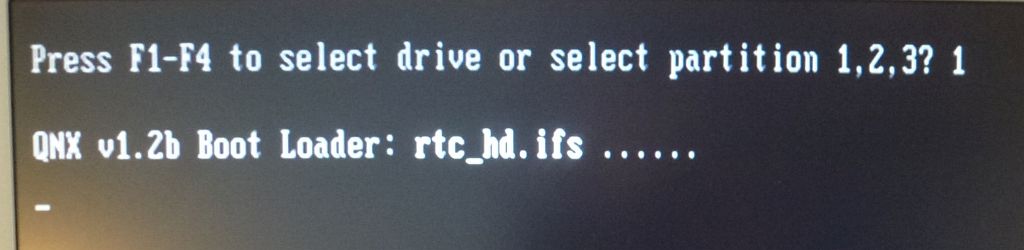
Anyway, the boot process hangs right after “QNX v1.2b Boot Loader” as you can see in the picture. The cursor still blinks, but nothing happens. I tried it many times, left it on for over 10min, but no change, just blinking. I am able to boot a Live LINUX from a USB-Stick and also ran memtest86+ without any errors.
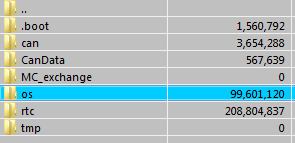
Please find the attached screenshots for the files system present on partition 1. Partition 2 looks similar, partition 3 is different and contains several *.gz/pax,cksum files.
Could someone tell me please why the boot process hangs and how to troubleshoot that? Shouldn’t I get a prompt at least? Or is it running properly in the background in fact, waiting for commands from one of its ports (ethernet/serial/CAN)? Is there a key combination that drops me to command line?
This forum here is quite restrictive. I wasn’t allowed to attach more then 1 image to my post, although I already added 4 more screenshots, showing part of the files present. So here’s the / directory of partition 1. Will add more photos in my next posts as required for troubleshooting.
If this is system is meant to be truly embedded (headless) then its very possible there is not going to be any terminal that you can log in on. The screen shot showing the boot process looks fine. The dots indicate the progress of the O/S during the boot process. If there are errors you normally get a letter (eg Q) shown at the end of the dots. The fact you don’t suggests the boot process finished successfully.
If you have a keyboard attached, you can try doing CTRL-ALT-(1-6) which tries to switch to console 1-6. Maybe if you are lucky there is a login terminal on one of the other consoles. But I would not be surprised if there isn’t in an embedded system. My guess is there is meant to be a Windows / Linux GUI that connects to the QNX O/S (tcp/udp most likely) that allows interaction with the running system.
Out of curiosity, what are you trying to accomplish by logging into the QNX O/S and where did you get this SIMATIC industrial PC? When I googled around this is the only thing I found mentioning QNX support on a SIMATIC PC and it’s very old (15 years).
I’m just going to add what little I can to Tim’s otherwise fine answer. I find the text “QNX v1.2b Boot Loader” curious as I’ve never seen this before, and I’ve seen a lot of QNX system. That doesn’t mean the boot loader doesn’t come from QNX, but it is a bit unusual.
As Tim mentioned, it looks like the loading of the IFS file worked. After this happens, the OS is jumped into. Normally it then starts running a build script which is embedded in the IFS file. It’s common to have that script write some output. Since you have a screen, that is the most common place the output would go to. It’s also possible that there is no output.
If you had access to the right QNX development system and the build script, you could put in some diagnostic messages in the build script to see where something goes wrong. I suspect that is not an option, and consquently you are probably SOL.
You could try booting off one of the other two partitions. To do that if you time it right you could press ‘2’ or ‘3’ on an attached keyboard and have the boot loader try to boot off of one of the two partitions.
In the distant past, CTRL-Z would bring up a login on an empty console, so you can try that.
Thanks to both of you guys! Now that I knew that the boot sequence completed without error and it does seem to run in the background, I started investigating further.
None of the above key combinations worked. I was unable to get a prompt at this stage.
Next thing was to try network access (2 eth ports), but the thing wouldn’t request a DHCP lease (BOOTP). So it must have a fixed IP.
I digged around a little more and by examining the .IFS boot image under /.boot in a hex editor, looking for an IP address, I found the string “…-D8250.3f8.38400…”. So I finally succeeded with a serial null-modem cable and a terminal program set to 38400, 8N1.
The boot sequence ends with
…
BOOTMODE is download
RTC boot with QNX 6.5.0
InitRtc: No IO-Box found
rtcboot.conf done
#
So there’s my prompt! That was the only goal I had, just to confirm it is working and what I can do with it. Apparently not too much I believe. One would require a proper documentation as this is probably a genuine, purpose-built software for some kind of system or machine. Got it from someone else, and he also has no idea where it came from. I can enter commands (ls etc) just like on linux. I also found /os/etc/shadow which shows 2 users with hashed passwords (13 ASCII chars). I could probably reset those by setting them to an empty string (::).
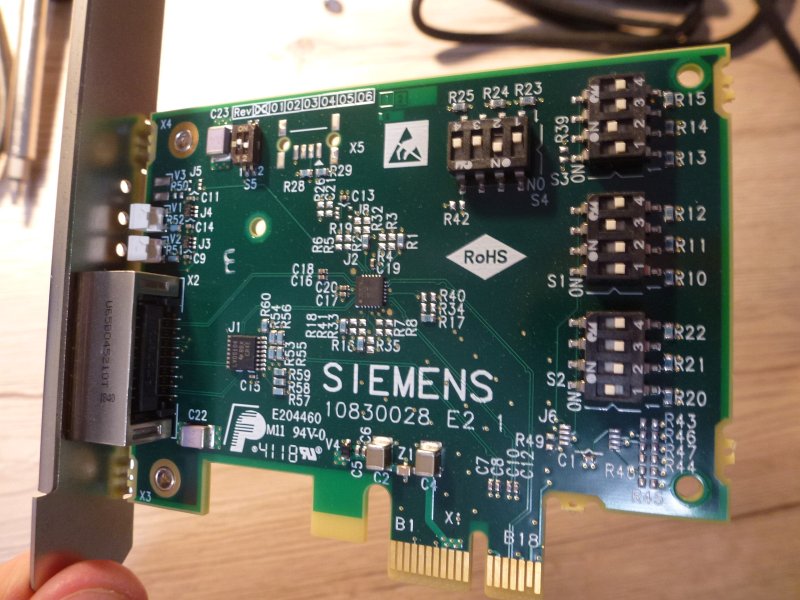
Btw, it’s not something I would really call “embedded” (which sounds like an ARM/STM/ATMEL AVR to me). This in fact is an Intel Core i3 1.6 GHz sitting on a small motherboard in a metal cage, SO-DIMM RAM slot, and one additional card. I’m not even sure about the plug, I’ve never seen this, but I am also not very familiar with industrial electronics. It is powered by 24V and only draws 0.5A (12W) under 0% CPU load. You may want to look up SIMATIC Microbox PC to get an idea.
You can use ‘ifconfig -a’ to see the network interfaces and if any are assigned to an IP address. The ‘Netstat’ command also gives networking information.
The ‘pidin’ command will list all the running processes in the system (top only shows ones that are actively using CPU).
Ah, right! Thanks Tim! Didn’t think of that one yet since I just got access to the command line and had my head full of other things on my schedule for today.
A note on disabling the passwords. In /etc/passwd you will see [colon] x [colon]. I’m writing it this way becase the damn editor here keeps turning this squence into .
If you remove the x, you can login with just the userid. If you want to then set the pass word you use the passwd command.
Thanks! Funny thing is that /os/etc/passwd contains several users, including ‘root’ which has no password set So Telnet login as root without password was possible
 .
. So Telnet login as root without password was possible