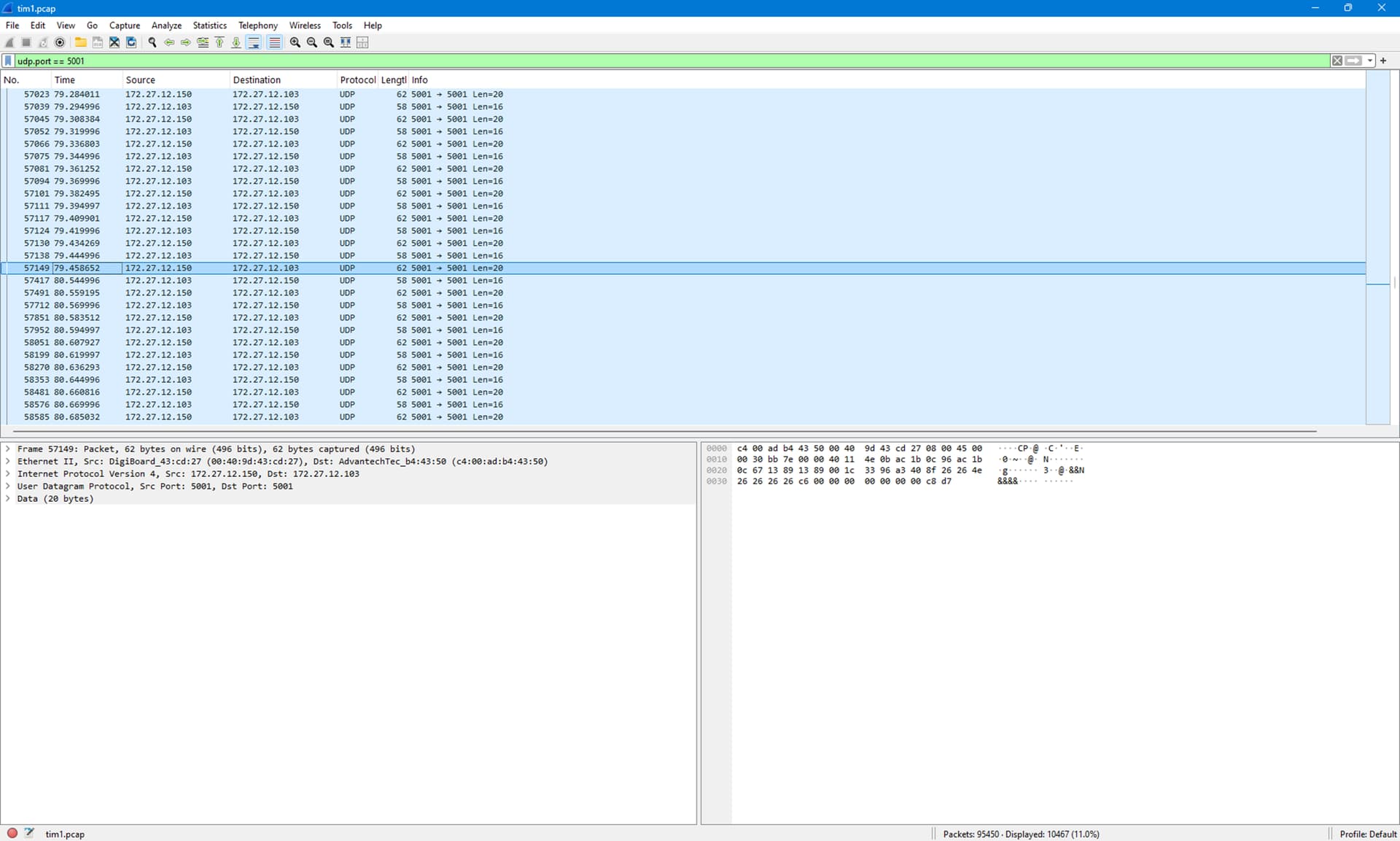
We are having a strange network issue on one of our systems in the field. Every 20 minutes or so we’ll get a brief drop out to a serial to Ethernet device we regularly get data from (every 25 or so milliseconds). Our systems have multiple of these serial to Ethernet devices but the drop out only happens to one of them. We’ve already replaced the device with a spare but the problem persists.
I got a tcpdump capture of when it happened and at the highlighted point you can see the traffic stops for a full second. We poll for data so the 1 second drop out means we stopped polling for that second.
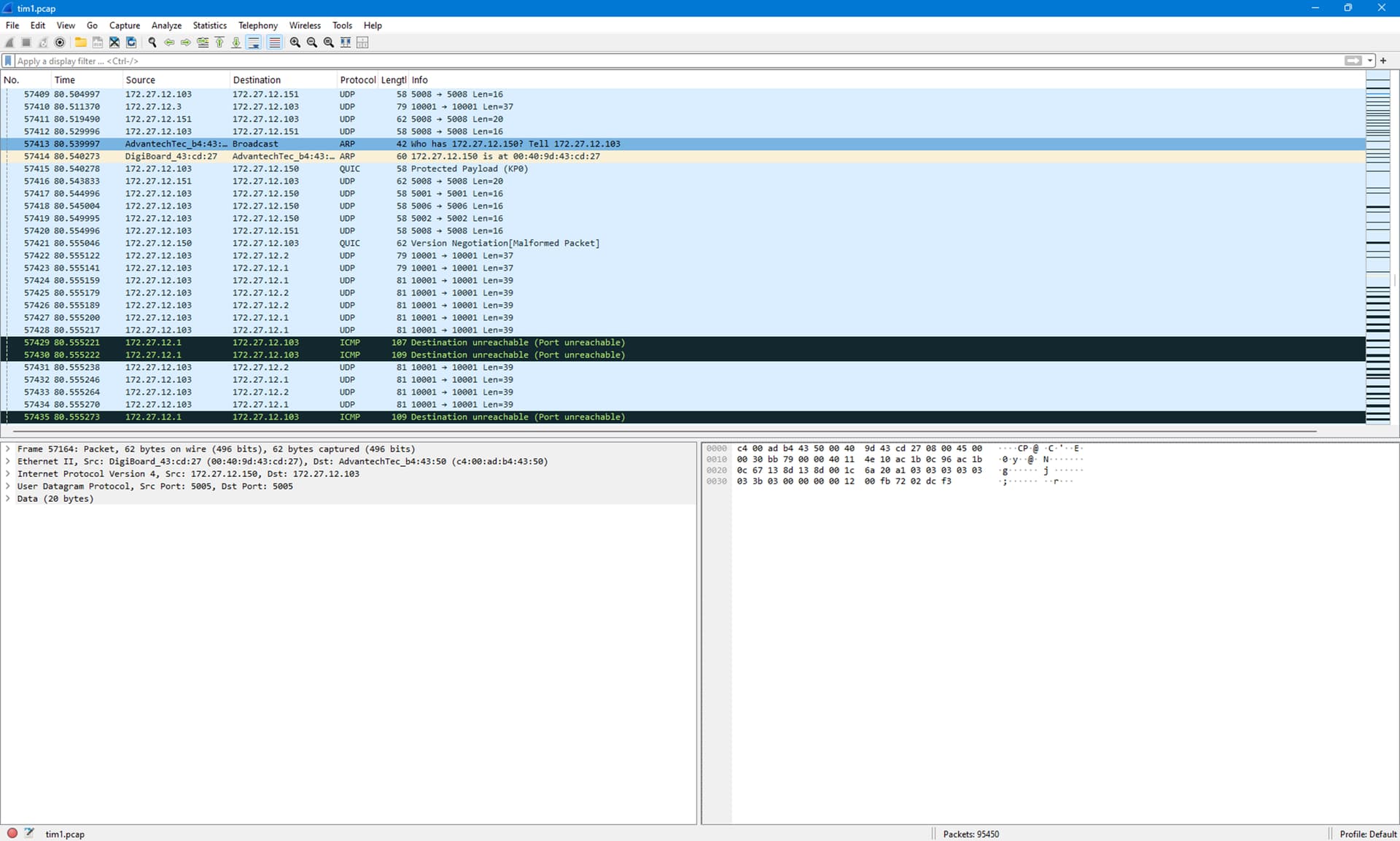
When I remove the filter and see why it started working again I noticed this. There is an arp request from QNX looking for the .150 node. Once it finds it, everything starts working again.
Googling around, I found evidence that QNX arp table goes stale roughly every 20 minutes (when our problem happens). But we are getting plenty of traffic from the other side so it should never go stale.
I had them do a nicinfo command and everything looks fine (no errors of any kind that would indicate a bad network card or faulty cable at least on the QNX PC).
I’m out of ideas as to why on just this system to just 1 device we’d get a 1 second hang every 20 minutes that looks like a stale arp cache issue. Anyone seen anything like this or have any suggestions to try and diagnose what’s going on (next steps are to replace network switch or cable to the device that has the problem).
I doubt this will help, but it might give you some ideas. A few years ago I was called in to help with a problem at a nearby post office package facility. I helped build a system for them that scanned and routed packages. The problem was that a node in the system would keep losing contact over the network. The system used a local area network but was connected to a wide area network through a router. I watched the system for a while and figured out that something was going wrong with the ARP table. The idea is that within a local network, TCP/IP wants to send packets a specific MAC address. When you try to connect, a protocol called ARP is used to get the MAC address. It keeps a table connecting IP and MAC addresses. It was all quite confusing until someone came by and mentioned that they had two of these systems. Both systems used the same IP addresses. At that point I predicted that we would find some missconnected ethernet cables, which turned out to be the case. One of the system had its internal 192.168.*.* network connected directly to the outside WAN. Occasionally the the other system would be convinced that one of its nodes was outside the network which would look like it was disconnected.
I remember you posting that story before. One of the things I did when I saw the Arp request was to look at the MAC address that came with the .150 node packets before the problem happened and again after the Arp reply. They were the same. Of course there are hundreds of packets of data going to that .150 machine every couple of seconds and I didn’t inspect them all for MAC address but I feel confident that’s not the problem.
Our systems are a self contained network and we don’t even have a gateway machine so it seems very unlikely what happened in your case could happen in ours.
One other thing I didn’t mention is that this problem occurred as part of a QNX retrofit. The original system was shipped with QNX 6.32 (could be 6.5 as some systems got that version) more than a decade ago and has been working fine (or at least customer has not complained). But we can no longer get those industrial PCs anymore so as part of the PC replacement we’ve upgraded to QNX 7 (this upgrade to 7.0 happened a few years ago and has been deployed on new and retrofits before just fine). Our tech was on site doing the retrofit when this problem happened. Not sure if any other equipment on the system was upgraded as part of this process (often we upgrade other obsolete hardware). Thought I’d mention it just in case it triggers anything else in your thoughts.
Since I made the initial post our tech has returned with the original .150 device that was replaced. We’ve deployed it in our lab here with no issues (we don’t have the mysterious dropout every 20 minutes) which makes me think the original device was fine and the replacement is probably fine too. We won’t get access to the customer site again for a while (month or two I think) so we are trying to come up with things to troubleshoot the next time we do.
I agree. What I saw would not happen in an isolated system.
When you say serial to ethernet, are you talking about a USB to ethernet device, which provides ethernet to a system without a NIC, or do you mean a box that connects via ethernet and has serial ports? I wrote a driver for the latter type of device once.
Coming back to this many months later as I was finally able to go on site in person to do some fault finding.
It turned out to be a bad 4 port dumb Ethernet switch. Why it caused the problem I have no idea as I tried using a different power supply, plugging into different ports on the 4 port switch etc. But as soon as I swapped out that 4 port switch for a new one the problem went away.
What’s crazy is that we’d set a timer on our phones for 19 minutes and come back and watch the final minute tick away and at 20 minutes the problem would occur. Eventually swapping out every price of equipment found it and then I tried swapping power supplies, different ports etc.